Adds a "Copy summary" button for issue pages on Jira.
目前為
This user script adds a "Copy summary" button for issue pages on Jira. The rich text (HTML) summary, which is great for pasting in Confluence and in Slack looks like this:
[MC-179867] Unicode Characters swapped in Minecraft
The plain text version looks like this:
[MC-179867] Unicode Characters swapped in Minecraft
The button to copy the summary is added to the regular menu of buttons:
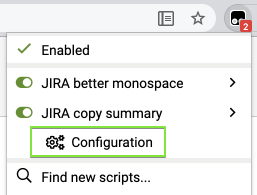
When on a Jira page, the script can be configured using the corresponding extension menu item (screenshot from Tampermonkey):
The script supports only Jira Server (self-hosted).
The script uses @include rules to work on any domain that includes the word jira. If your browser doesn't support @include (which might happen in the future when Chrome switches to Manifest V3 browser extensions) or your Bitbucket Server uses a domain which doesn't include the word jira, you'll have to manually add your domain. Up-to-date instructions are at https://github.com/rybak/atlassian-tweaks#custom-domains
Source code and full history can be seen on GitHub: https://github.com/rybak/atlassian-tweaks/blob/main/jira_copy_summary.user.js
More user scripts and user styles for Confluence, Jira, and Bitbucket in set Atlassian Tweaks.


