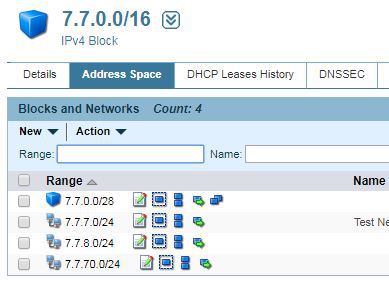
Add direct buttons for Block and Network Actions in BlueCat Address Manager
您需要先安裝使用者腳本管理器擴展,如 Tampermonkey、Greasemonkey 或 Violentmonkey 之後才能安裝該腳本。
You will need to install an extension such as Tampermonkey to install this script.
您需要先安裝使用者腳本管理器擴充功能,如 Tampermonkey或 Violentmonkey 後才能安裝該腳本。
您需要先安裝使用者腳本管理器擴充功能,如 Tampermonkey或 Userscripts 後才能安裝該腳本。
你需要先安裝一款使用者腳本管理器擴展,比如 Tampermonkey,才能安裝此腳本
您需要先安裝使用者腳本管理器擴充功能後才能安裝該腳本。
(我已經安裝了使用者腳本管理器,讓我安裝!)
你需要先安裝一款使用者樣式管理器擴展,比如 Stylus,才能安裝此樣式
你需要先安裝一款使用者樣式管理器擴展後才能安裝此樣式
(我已經安裝了使用者樣式管理器,讓我安裝!)
*/app*
Doing stuff over and over again always costs time, why not save some clicks.
This adds buttons next to the block or network range in the table view list to get direct access to edit/resize/split/ move actions without additional click effort.