(Deprecated) Instagram Source Opener

Open the original source of an IG post, story or profile picture

您需要先安裝使用者腳本管理器擴展,如 TampermonkeyGreasemonkeyViolentmonkey 之後才能安裝該腳本。

您需要先安裝使用者腳本管理器擴充功能,如 TampermonkeyViolentmonkey 後才能安裝該腳本。

您需要先安裝使用者腳本管理器擴充功能,如 TampermonkeyViolentmonkey 後才能安裝該腳本。

您需要先安裝使用者腳本管理器擴充功能,如 TampermonkeyUserscripts 後才能安裝該腳本。

你需要先安裝一款使用者腳本管理器擴展,比如 Tampermonkey,才能安裝此腳本

您需要先安裝使用者腳本管理器擴充功能後才能安裝該腳本。

(我已經安裝了使用者腳本管理器,讓我安裝!)

你需要先安裝一款使用者樣式管理器擴展,比如 Stylus,才能安裝此樣式

你需要先安裝一款使用者樣式管理器擴展,比如 Stylus,才能安裝此樣式

你需要先安裝一款使用者樣式管理器擴展,比如 Stylus,才能安裝此樣式

你需要先安裝一款使用者樣式管理器擴展後才能安裝此樣式

你需要先安裝一款使用者樣式管理器擴展後才能安裝此樣式

你需要先安裝一款使用者樣式管理器擴展後才能安裝此樣式

(我已經安裝了使用者樣式管理器,讓我安裝!)

作者
jomifepe
今日安裝
2
安裝總數
5,304
評價
32 3 3
版本
1.5.2
建立日期
2018-09-19
更新日期
2023-07-24
尺寸
76.1 KB
授權條款
MIT
腳本執行於

⚠️ No longer maintained

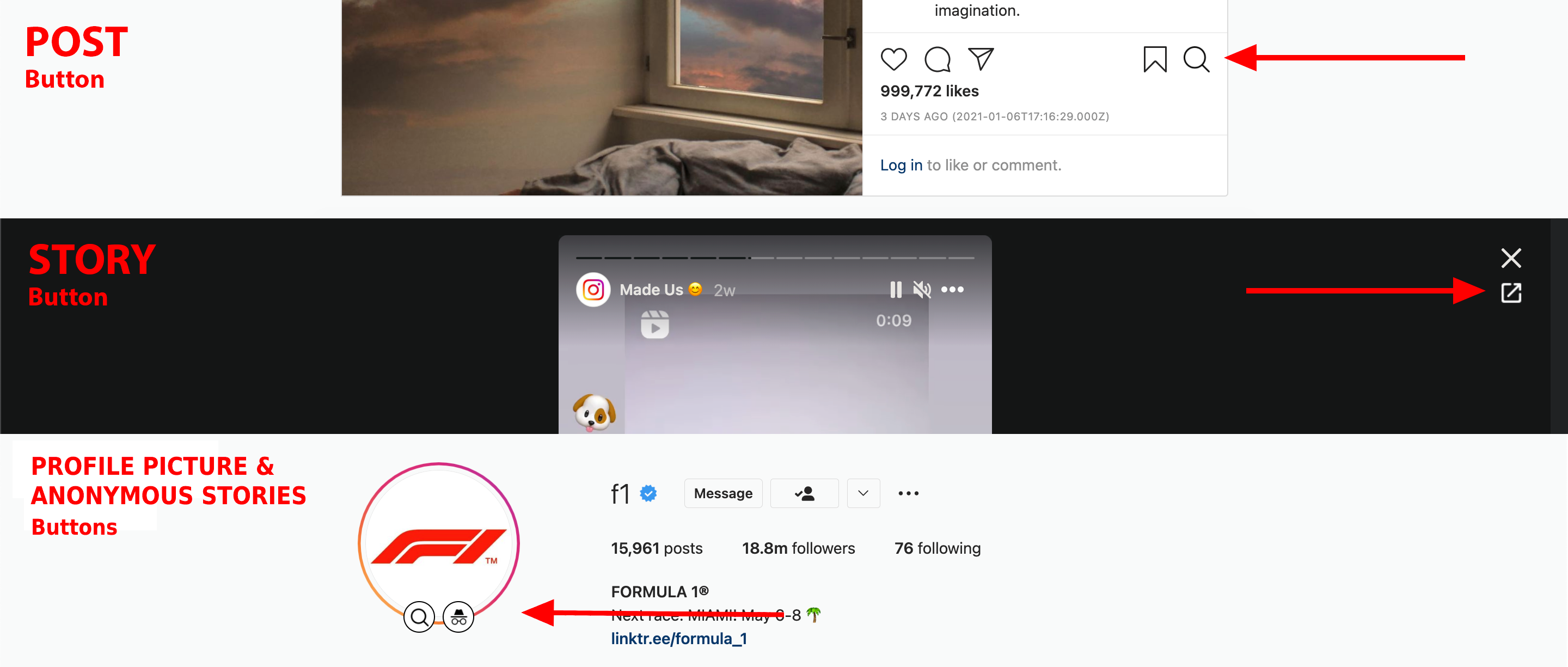
Adds a button to open the original source of an IG story, post or profile picture. No jQuery.

Features

  • View the original source of a Posts, Story, and Profile picture(1)
    • Even on private and not followed pages (requires login)
    • (1) Profile picture viewing is now achieved using the script's developer options, see more below on the settings section
  • Anonymous stories - Ability to view user stories without them knowing
  • Saving a post directly from the context menu (right-click)
    • Note: This is just convenience and it doesn't save the full size version
  • Posts show the full timestamp instead of a relative and more generic time
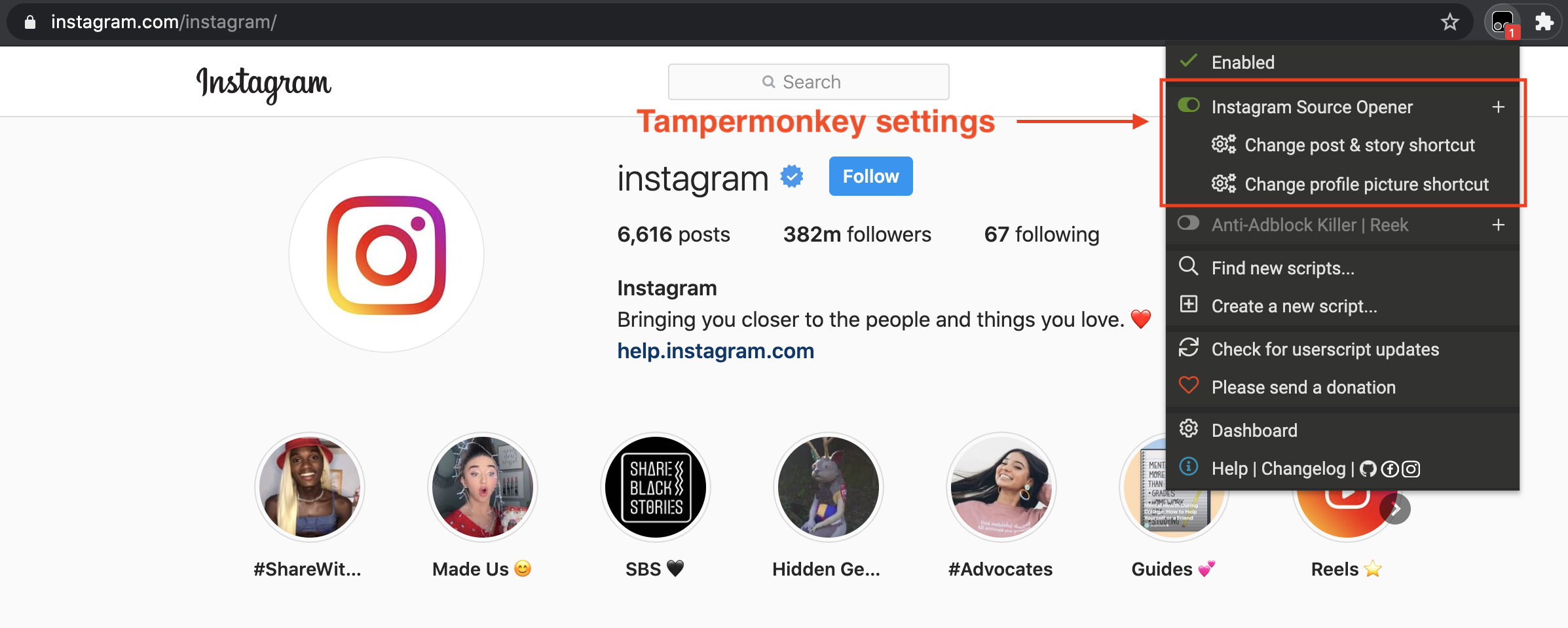
  • Ability to customise your experience (key bindings, default actions, etc. See more settings below)

Key bindings

Defaults:

  • Alt/⌥ + O - Opening single posts (pop-up) and stories
  • Alt/⌥ + P - Opening the profile picture on a profile page

These key bindings can be changed on the script's settings, see more below

Settings:

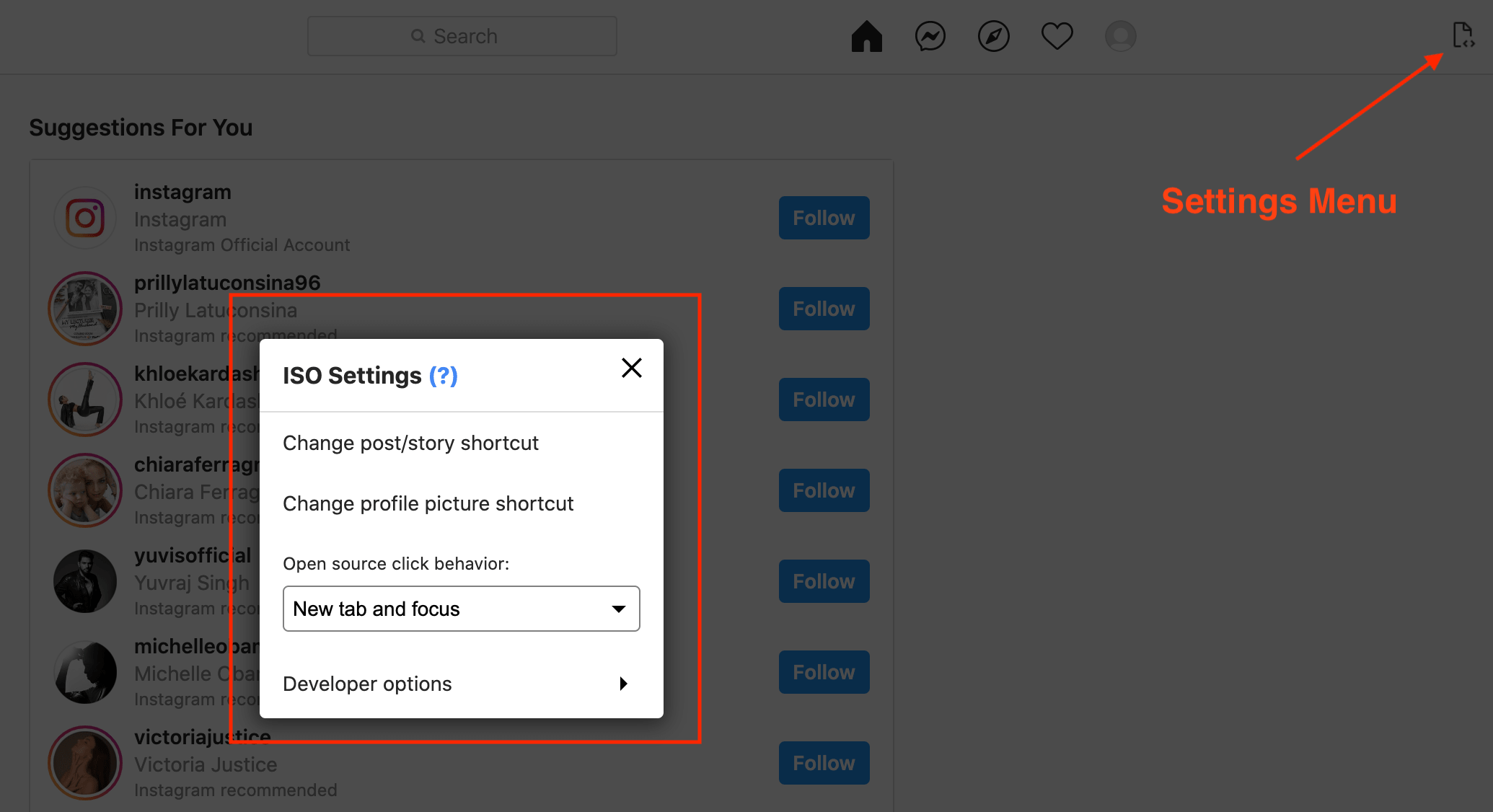
  • Changing the key bindings - These always use the Alt/⌥ key in combination with a letter, this option allows you to change the default letter.
  • Open source button behavior - Redirect or open in a new tab with or without focus.
  • Developer options
    • Options available on the script's settings menu (see images below). These are more developer-oriented, but by following the provided instructions, anyone can use them.
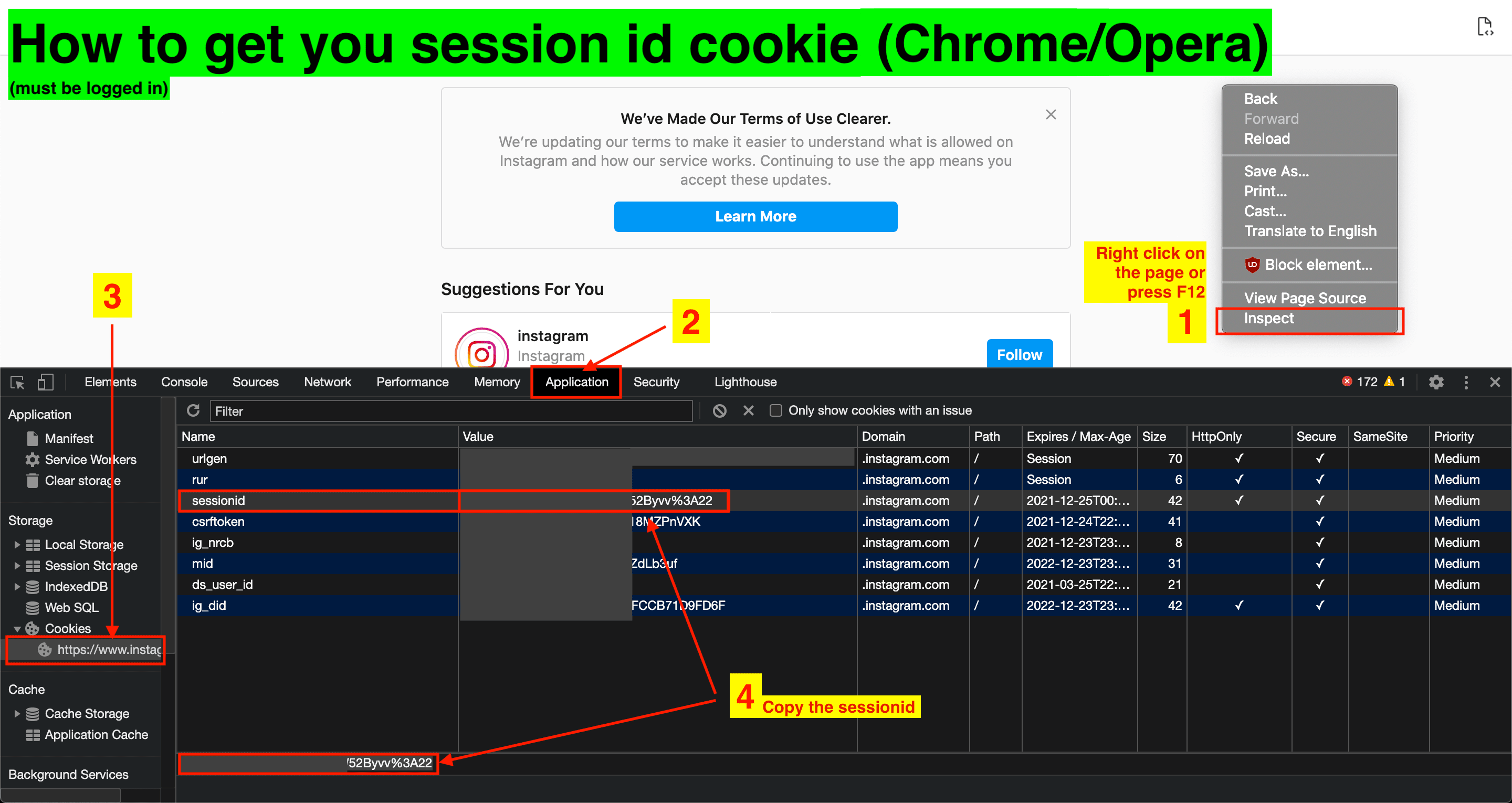
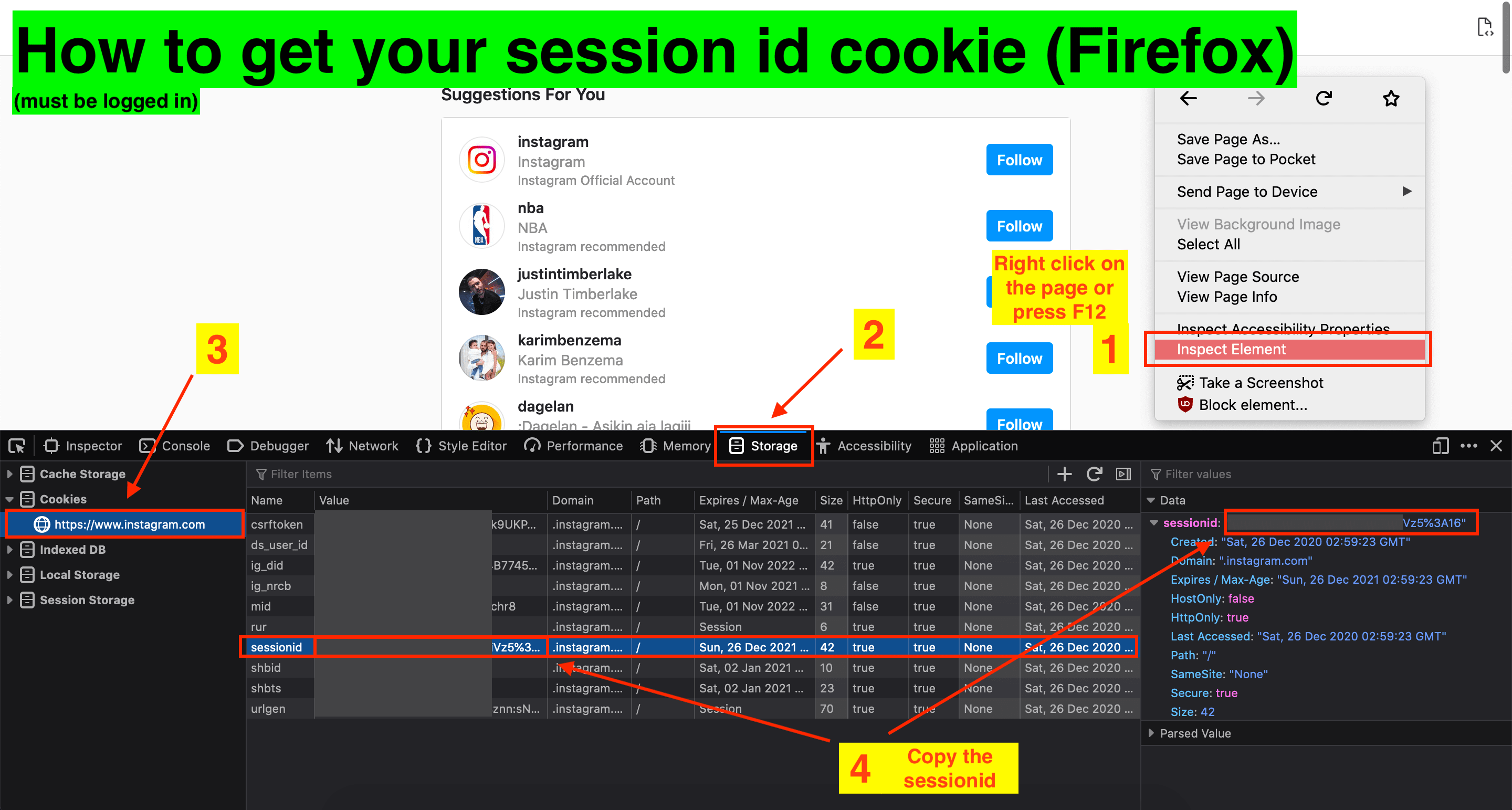
    • Session ID:
      • The session id determines your current login and it's used to get full size profile pictures using the instagram API. Without this, you will get low-res profile pictures. See how to get your session id on the images below and the News/Difficulties section for more a detailed explanation.

Compatibility

  • Chrome: Tampermonkey, Violentmonkey & MeddleMonkey
  • Firefox: Tampermonkey, Greasemonkey & Violentmonkey
  • Opera: Tampermonkey & Violentmonkey (Chrome extension support)
  • Edge (Chromium-based version): Tampermonkey & Violentmonkey
  • Vivaldi: Uses the chrome web store, so same as chrome

Note: I cannot guarantee compatibility with third-party Instagram viewers/extensions (common on Opera), only with the actual website.

Notes

  • Pop-ups might be blocked on the first time opening any picture, you need to allow it (on the address bar)
  • Multiple pop-ups to allow Cross-Origin Requests might appear on the first time, accept those as well.

If you like the script and would like to share your appreciation:

donate button


Images

Open source button locations:

open source button locations

Tampermonkey settings menu:

tampermonkey settings menu

On-page settings menu:

on-page settings menu

Getting the sessionid on chrome & opera:

getting sessionid chrome & opera

Getting the sessionid on firefox:

getting sessionid firefox