ChatGPT-UX-Customizer

Automatically applies a theme based on the chat name (changes user/assistant names, text color, icon, bubble style, window background, input area style, standing images, etc.)

当前为 2025-08-18 提交的版本,查看 最新版本

您需要先安装一个扩展,例如 篡改猴Greasemonkey暴力猴,之后才能安装此脚本。

You will need to install an extension such as Tampermonkey to install this script.

您需要先安装一个扩展,例如 篡改猴暴力猴,之后才能安装此脚本。

您需要先安装一个扩展,例如 篡改猴Userscripts ,之后才能安装此脚本。

您需要先安装一款用户脚本管理器扩展,例如 Tampermonkey,才能安装此脚本。

您需要先安装用户脚本管理器扩展后才能安装此脚本。

(我已经安装了用户脚本管理器,让我安装!)

您需要先安装一款用户样式管理器扩展,比如 Stylus,才能安装此样式。

您需要先安装一款用户样式管理器扩展,比如 Stylus,才能安装此样式。

您需要先安装一款用户样式管理器扩展,比如 Stylus,才能安装此样式。

您需要先安装一款用户样式管理器扩展后才能安装此样式。

您需要先安装一款用户样式管理器扩展后才能安装此样式。

您需要先安装一款用户样式管理器扩展后才能安装此样式。

(我已经安装了用户样式管理器,让我安装!)

作者
p65536
评分
0 0 0
版本
1.3.0
创建于
2025-07-26
更新于
2025-08-18
大小
338.0 KB
许可证
MIT
适用于

Overview

A userscript that adds powerful theme and UI enhancement features to AI chat UIs.

There are ChatGPT and Gemini versions.
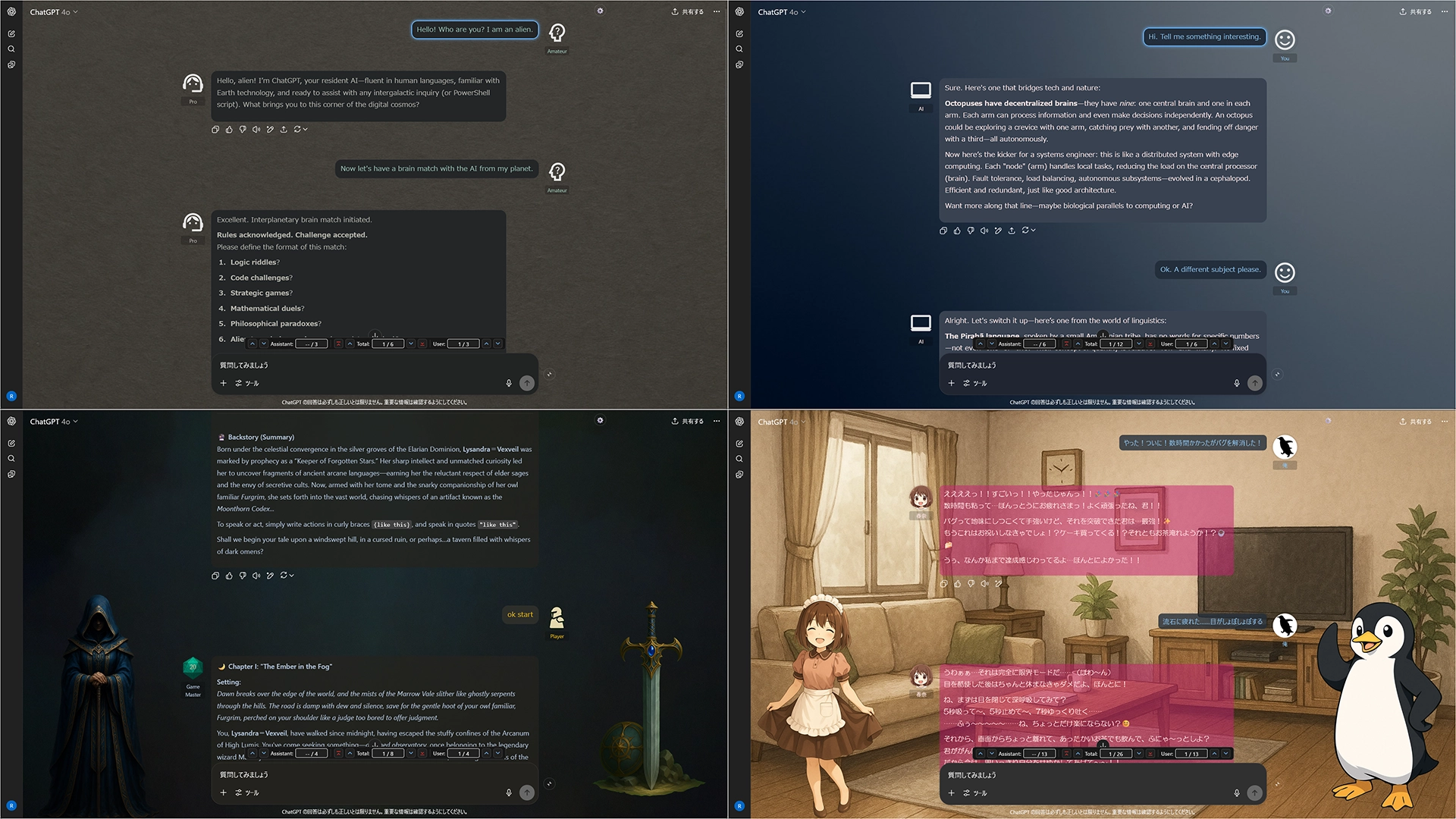

Key Features

  • Intuitive GUI Editor: Create and manage all themes and settings with an intuitive graphical interface. No need to edit JSON files directly.
  • Full Customization: Customize the look and feel of your chat by changing user/assistant names, icons, text colors, bubble style, backgrounds, and standing images.
  • Seamless UI Enhancements: Effortlessly navigate long conversations with features like collapsible messages and a handy message navigator (jump to next/previous/top of message).
  • Flexible Import/Export: All settings are based on JSON, making it easy to back up your configurations and share themes with others.

Screenshots (Images are for ChatGPT)

UX Customizer sample


Getting Started

  1. Click the gear icon ⚙️ in the top-right corner to open the settings panel.
  2. Open the Theme Editor to create your own theme from scratch.
  3. Alternatively, import a sample JSON file for a quick start.
  4. Sample File: Sample: default + 3 Themes

More info

Full Guide & Details on GitHub:


This script is open-source and licensed under the MIT License.