BlueCat Address Manager Dynamic Tab Title

Dynamic HTML Tab Title in BlueCat Address Manager

您需要先安装一个扩展,例如 篡改猴Greasemonkey暴力猴,之后才能安装此脚本。

You will need to install an extension such as Tampermonkey to install this script.

您需要先安装一个扩展,例如 篡改猴暴力猴,之后才能安装此脚本。

您需要先安装一个扩展,例如 篡改猴Userscripts ,之后才能安装此脚本。

您需要先安装一款用户脚本管理器扩展,例如 Tampermonkey,才能安装此脚本。

您需要先安装用户脚本管理器扩展后才能安装此脚本。

(我已经安装了用户脚本管理器,让我安装!)

您需要先安装一款用户样式管理器扩展,比如 Stylus,才能安装此样式。

您需要先安装一款用户样式管理器扩展,比如 Stylus,才能安装此样式。

您需要先安装一款用户样式管理器扩展,比如 Stylus,才能安装此样式。

您需要先安装一款用户样式管理器扩展后才能安装此样式。

您需要先安装一款用户样式管理器扩展后才能安装此样式。

您需要先安装一款用户样式管理器扩展后才能安装此样式。

(我已经安装了用户样式管理器,让我安装!)

作者
Marius Galm
日安装量
0
总安装量
6
评分
0 0 0
版本
6
创建于
2018-02-20
更新于
2018-06-05
大小
3.3 KB
许可证
MIT
适用于

Hello to all BlueCat Administrators out there.

Have you ever opened a lot of tabs and completely lost overview about where to click? Here is a script that can help you out by check the sites syntax and adding a dynamic name to the tab title for the object currently shown in the tab.
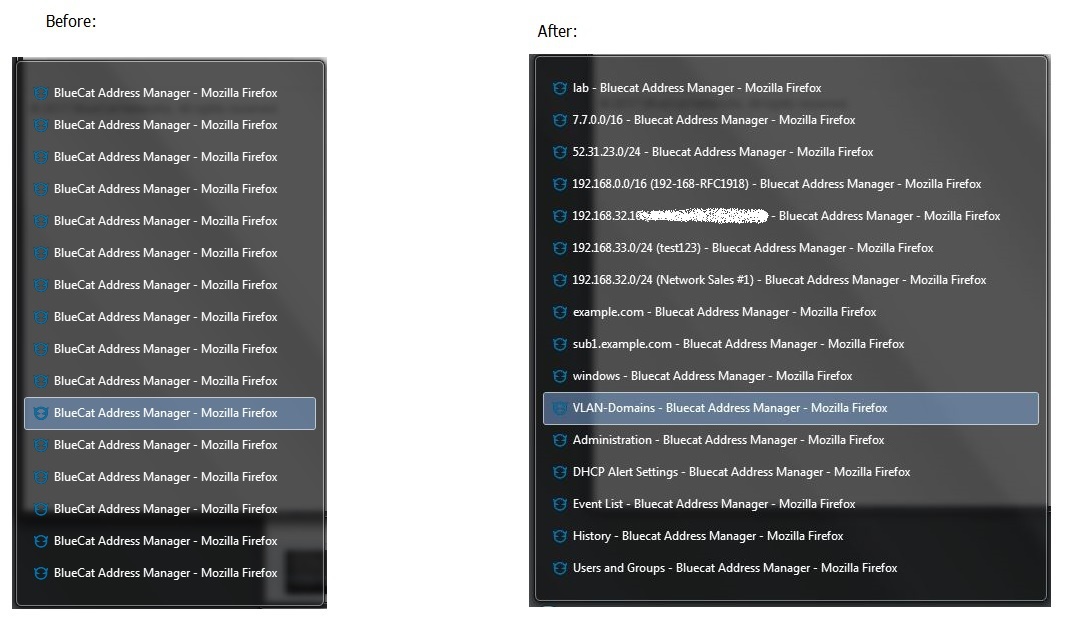
Here a picture worth a thousand words

- updated to incorporate the product version and sub-tab information on the configuration page -