Greasy Fork 还支持 简体中文。

IMDB | Full Quality Image Downloader

Download full-resolution images from IMDB with a single click — both from the media viewer (gallery slideshow) and the gallery index (mosaic grid).

You will need to install an extension such as Tampermonkey, Greasemonkey or Violentmonkey to install this script.

You will need to install an extension such as Tampermonkey to install this script.

You will need to install an extension such as Tampermonkey or Violentmonkey to install this script.

You will need to install an extension such as Tampermonkey or Userscripts to install this script.

You will need to install an extension such as Tampermonkey to install this script.

You will need to install a user script manager extension to install this script.

(У мене вже є менеджер скриптів, дайте мені встановити його!)

You will need to install an extension such as Stylus to install this style.

You will need to install an extension such as Stylus to install this style.

You will need to install an extension such as Stylus to install this style.

You will need to install a user style manager extension to install this style.

You will need to install a user style manager extension to install this style.

You will need to install a user style manager extension to install this style.

(I already have a user style manager, let me install it!)

Автор
piknockyou
Щоденних встановлень
0
Всього встановлень
4
Рейтинги
0 0 0
Версія
1.6
Створено
11.02.2026
Оновлено
19.03.2026
Size
13,7 кБ
Ліцензія
AGPL-3.0
Відноситься до

☕ If you find this tool helpful & would like to support its maintenance, please consider leaving a tip on

ko-fi.com/piknockyou

Thank you! :-)


🖼 For a quick impression of this script, refer to the screenshots below.


IMDB | Full Quality Image Downloader

Download full-resolution images from IMDB with a single click — both from the media viewer (gallery slideshow) and the gallery index (mosaic grid).

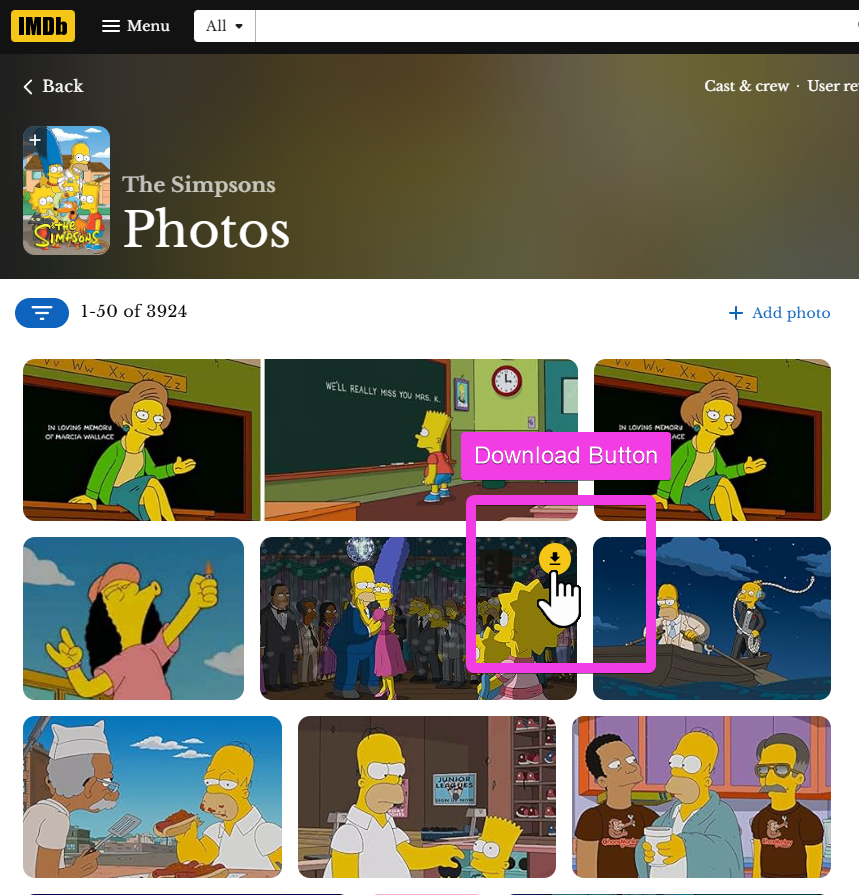
Gallery mosaic grid view with download buttons on each tile

Gallery grid — download button on every tile

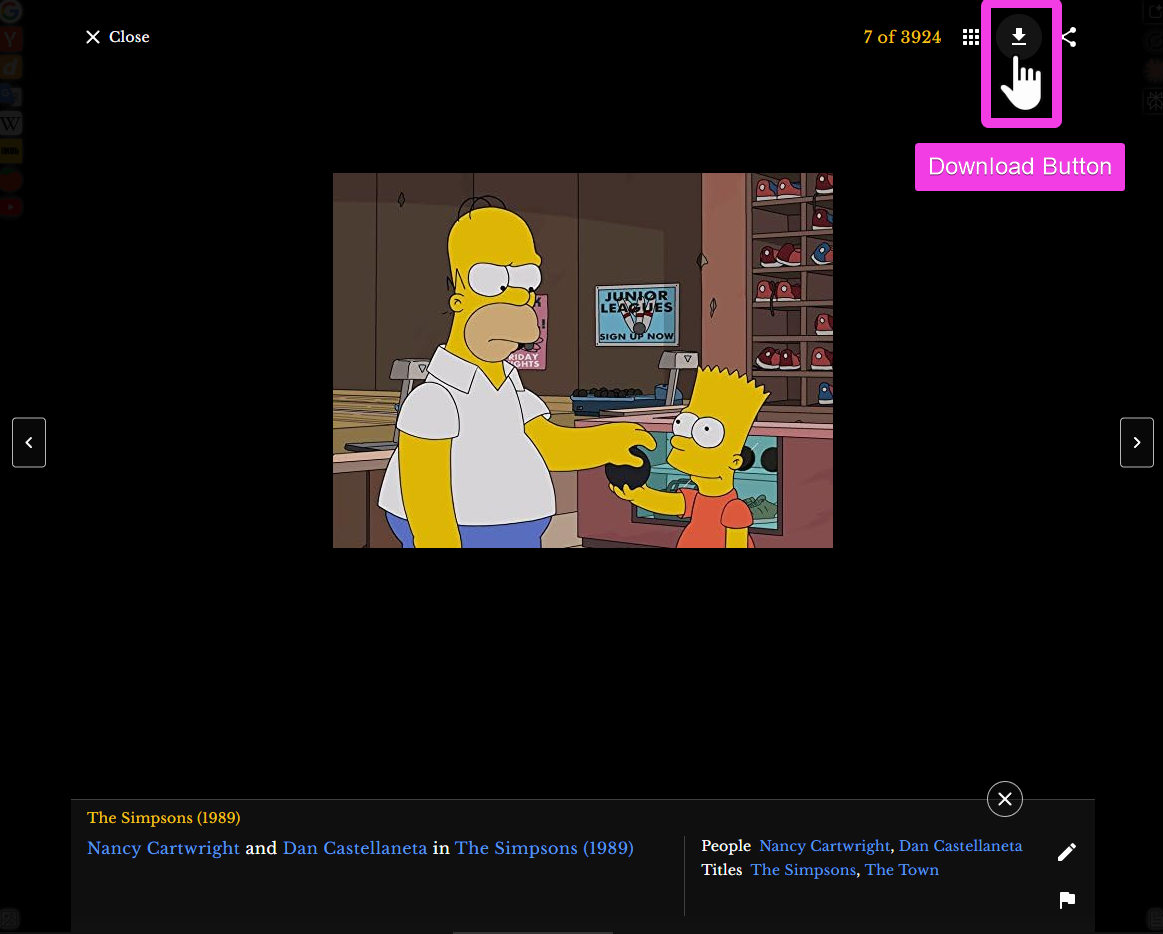
Media viewer with download button in toolbar

Media viewer — download button in the toolbar

Why You Need This

IMDB makes it surprisingly hard to save images:

  • Media viewer — Right-clicking the image gives you the generic browser context menu (as if clicking empty space). There's no "Save image as…" because a transparent overlay blocks it.
  • Gallery grid — Right-click works here, but only saves a tiny thumbnail — not the full-resolution original.
  • Manual URL editing — The full-quality files exist on IMDB's servers, but you'd have to strip resize parameters like _V1_FMjpg_UX1169_ from the URL yourself every time.

This script adds download buttons that automatically fetch the maximum available resolution — no URL editing, no workarounds.

What It Does

🎬 Media Viewer (Slideshow)

  • Download button in the toolbar — sits natively next to the gallery/share icons
  • Always downloads the currently visible image — correctly ignores preloaded prev/next images
  • Brief gold highlight + toast notification on click

🖼 Gallery Index (Mosaic Grid)

  • Download button on every tile — appears in the top-right corner on hover
  • Handles lazy loading — new tiles get buttons automatically as you scroll
  • Click downloads the image without opening the viewer

📐 Image Quality

Strips all resize/quality parameters from the URL:

Before: ...XkFqcGc@._V1_FMjpg_UX1169_.jpg
After:  [email protected]  ← original full resolution

Usage

ContextActionResult
Media viewerClick ⬇ button in toolbarDownloads current full-res image
Gallery gridHover tile → click ⬇ buttonDownloads that tile's full-res image

Works on all IMDB gallery types — titles, names, and any other section with a media viewer or image grid.

Installation

  1. Install Violentmonkey, Tampermonkey, or Greasemonkey
  2. Install this script
  3. Visit any IMDB page with images

Works immediately, no configuration needed.