Bilibili-Markdown

B站专栏 Markdown 编辑器

ของเมื่อวันที่ 08-10-2022 ดู เวอร์ชันล่าสุด

คุณจะต้องติดตั้งส่วนขยาย เช่น Tampermonkey, Greasemonkey หรือ Violentmonkey เพื่อติดตั้งสคริปต์นี้

You will need to install an extension such as Tampermonkey to install this script.

คุณจะต้องติดตั้งส่วนขยาย เช่น Tampermonkey หรือ Violentmonkey เพื่อติดตั้งสคริปต์นี้

You will need to install an extension such as Tampermonkey or Userscripts to install this script.

You will need to install an extension such as Tampermonkey to install this script.

You will need to install a user script manager extension to install this script.

(I already have a user script manager, let me install it!)

You will need to install an extension such as Stylus to install this style.

You will need to install an extension such as Stylus to install this style.

You will need to install an extension such as Stylus to install this style.

You will need to install a user style manager extension to install this style.

You will need to install a user style manager extension to install this style.

You will need to install a user style manager extension to install this style.

(I already have a user style manager, let me install it!)

ผู้เขียน
LuckyPuppy514
คะแนน
0 0 0
เวอร์ชัน
1.0.0
สร้างเมื่อ
08-10-2022
อัปเดตเมื่อ
08-10-2022
Size
16.4 กิโลไบต์
สัญญาอนุญาต
MIT
ปรับใช้กับ

banner

🌟 简介

一个让B站专栏支持 Markdown 的油猴脚本,支持 Markdown 原生语法以及B站专属语法

如果本项目对你有帮助,请帮忙点击 GitHub 右上角的小星星 🌟,万分感谢 🙏

20221008140233

🐳 安装

  1. 油猴插件

  2. 油猴脚本

✍️ 使用

工具栏

51589f818d3d203d3c6260764354289a11abf772

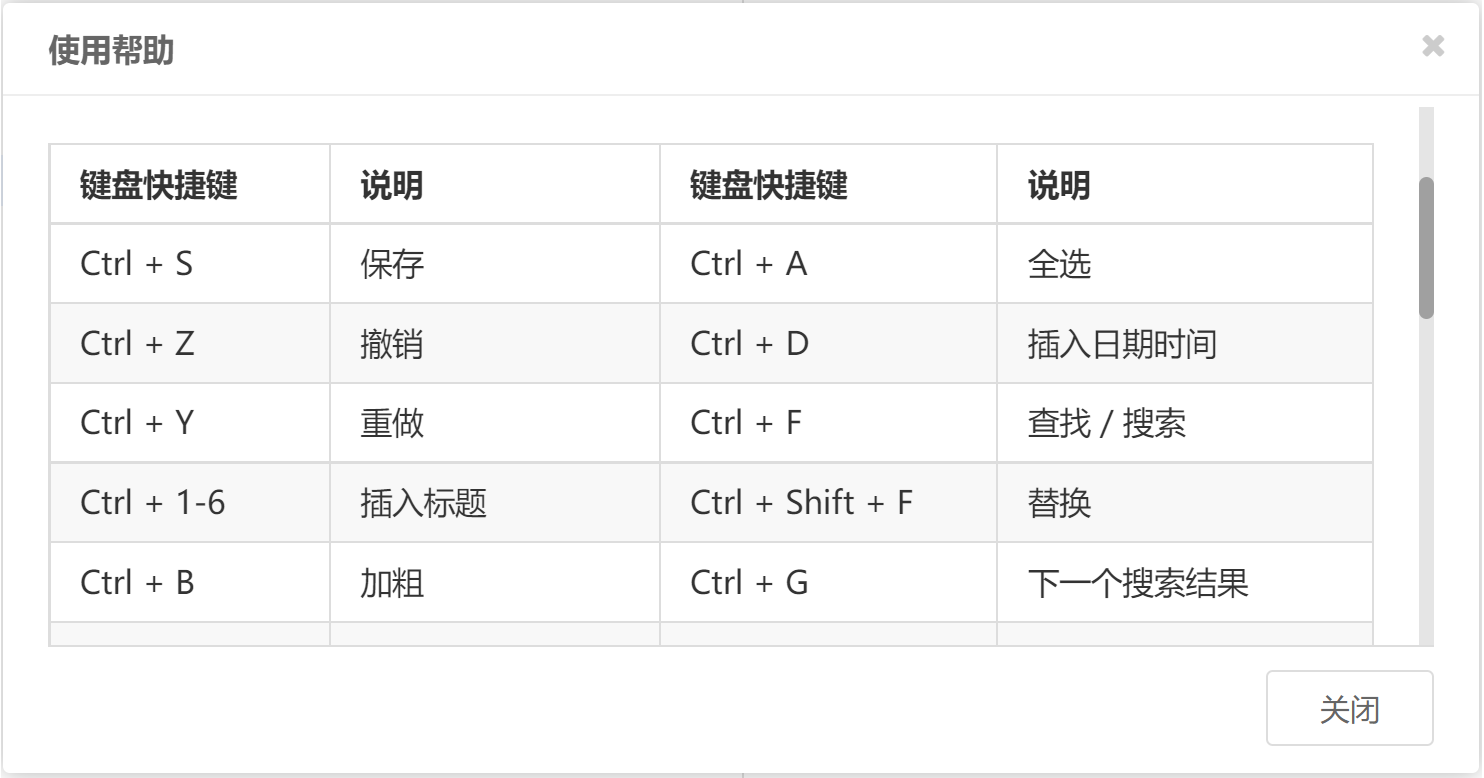
快捷键(可通过 Shift + Alt + H 打开 使用帮助 查看到所有快捷键)

🔥 注意:使用快捷键时需要把鼠标焦点置于编辑框内
d8ab885fe2b2541e990c2a9dfb0d04240a7852b7

👏 相关仓库

😘 如何贡献

非常欢迎你的加入!

🃏 使用许可

MIT © LuckyPuppy514
