Greasy Fork 还支持 简体中文。

BlueCat Address Manager Restore Button

Additional Restore Button in Transaction Details in BlueCat Address Manager

Stan na 05-06-2018. Zobacz najnowsza wersja.

Aby zainstalować ten skrypt, wymagana jest instalacje jednego z następujących rozszerzeń: Tampermonkey, Greasemonkey lub Violentmonkey.

You will need to install an extension such as Tampermonkey to install this script.

Aby zainstalować ten skrypt, wymagana jest instalacje jednego z następujących rozszerzeń: Tampermonkey, Violentmonkey.

Aby zainstalować ten skrypt, wymagana będzie instalacja rozszerzenia Tampermonkey lub Userscripts.

You will need to install an extension such as Tampermonkey to install this script.

Aby zainstalować ten skrypt, musisz zainstalować rozszerzenie menedżera skryptów użytkownika.

(Mam już menedżera skryptów użytkownika, pozwól mi to zainstalować!)

You will need to install an extension such as Stylus to install this style.

You will need to install an extension such as Stylus to install this style.

You will need to install an extension such as Stylus to install this style.

Będziesz musiał zainstalować rozszerzenie menedżera stylów użytkownika, aby zainstalować ten styl.

Będziesz musiał zainstalować rozszerzenie menedżera stylów użytkownika, aby zainstalować ten styl.

Musisz zainstalować rozszerzenie menedżera stylów użytkownika, aby zainstalować ten styl.

(Mam już menedżera stylów użytkownika, pozwól mi to zainstalować!)

Autor
Marius Galm
Oceny
0 0 0
Wersja
6
Utworzono
20-02-2018
Zaktualizowano
05-06-2018
Rozmiar
1,47 KB
Licencja
MIT
Dotyczy

Hello to all BlueCat Administrators out there.

Have you ever checked the details of a transaction you want to restore and wondered why there is no restore button?

Here is a script that can help you out by checking the transaction id and adding a link to restore the transaction currently displayed.

An example:
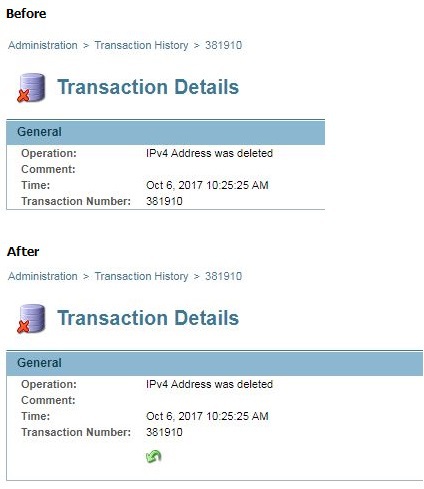
Here an image worth a thousand words