youtube-comment-censor-detector

A real-time comment checker, Fuck YouTube’s deceptive comment censorship

As of 04.06.2025. See ბოლო ვერსია.

You will need to install an extension such as Tampermonkey, Greasemonkey or Violentmonkey to install this script.

You will need to install an extension such as Tampermonkey to install this script.

You will need to install an extension such as Tampermonkey or Violentmonkey to install this script.

You will need to install an extension such as Tampermonkey or Userscripts to install this script.

You will need to install an extension such as Tampermonkey to install this script.

You will need to install a user script manager extension to install this script.

(I already have a user script manager, let me install it!)

You will need to install an extension such as Stylus to install this style.

You will need to install an extension such as Stylus to install this style.

You will need to install an extension such as Stylus to install this style.

You will need to install a user style manager extension to install this style.

You will need to install a user style manager extension to install this style.

You will need to install a user style manager extension to install this style.

(I already have a user style manager, let me install it!)

ავტორი
freedom-introvert
რეიტინგი
0 0 0
ვერსია
1.0.0
შექმნილია
04.06.2025
განახლებულია
04.06.2025
Size
73,3 KB
ლიცენზია
GPL
გამოყენებს მათ

YouTube发评反诈-油猴

一个YouTube实时评论检查器,自动检查评论状态,防止评论被儿童偷偷误食你还被蒙在鼓里!

简要使用说明

这里仅介绍脚本如何使用,完整说明请看项目地址 https://github.com/freedom-introvert/youtube-comment-censor-detector 建议来这了解一下YouTube如何控评

功能

支持项

支持的评论区

  • 视频(Shorts请使用这个插件,将Shorts替换成正常的视频网页)
  • 帖子

支持评论区根评论和在评论上的回复(楼中楼)

使用

发送一条评论,新添加的评论下会插入一个评论检查器,每隔5秒检查一次评论状态。

由于YT的评论审查较为耗时不能瞬间完成,所以评论的审查不是阻塞的,而是异步进行的,在审查期间,你的评论可能正常显示或者仅自己可见。YT审查评论最终裁定时间不会超过2分钟,平均裁定时间在评论发布之后的30秒左右。

该脚本的逻辑是,评论发送后每5秒检查一次评论状态,实时显示每次检查的状态,相当于实时监控。评论检查期间不影响你看视频什么的。如果你不想等太长时间,还可以点击“确认当前状态”来结束监控,建议至少等个30秒再确认。历史评论记录准备开发,发完评论后可再次到这里检查。
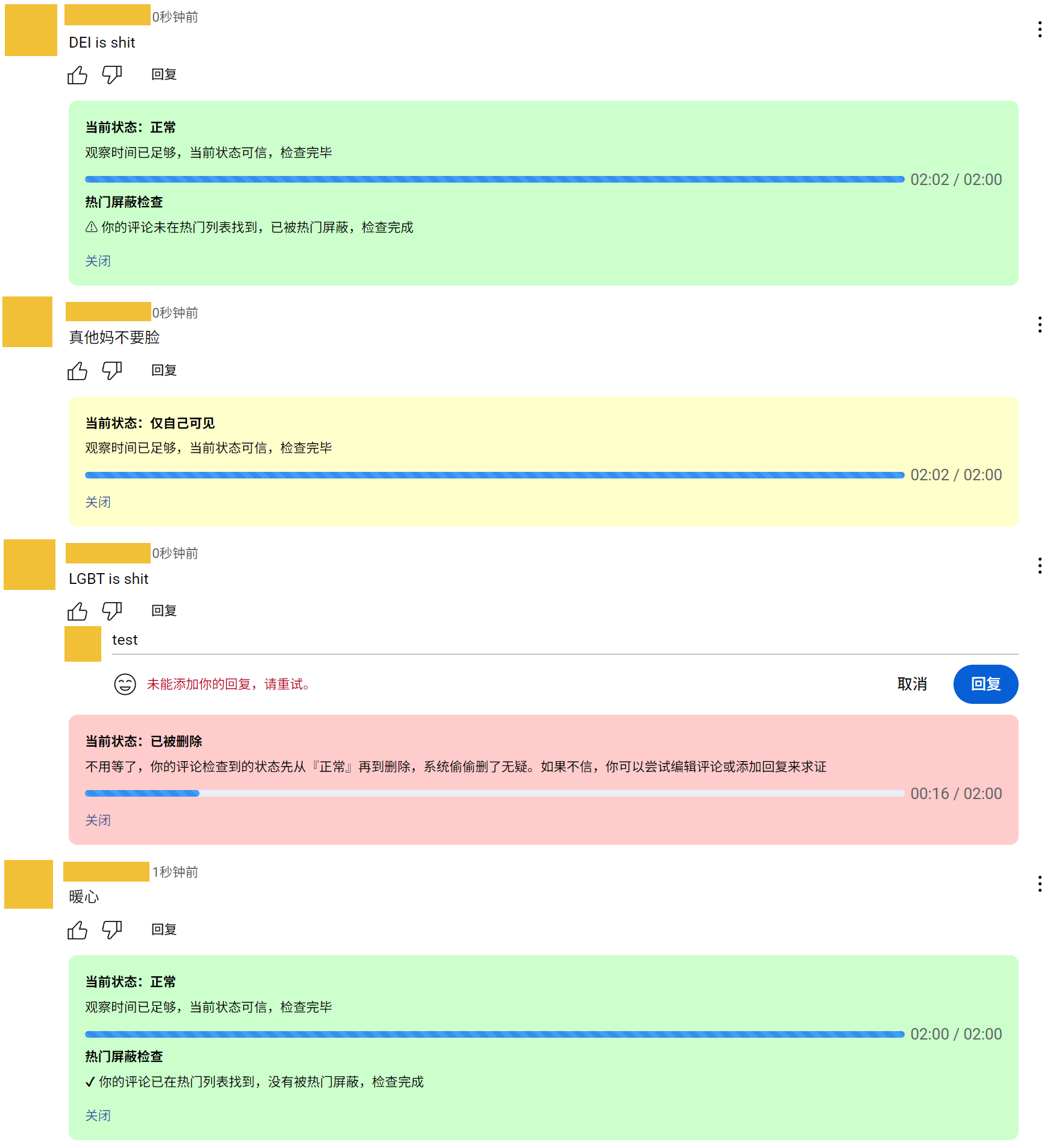
example

小技巧

如何分享评论?评论上的发送时间,如“1天前”这是一个链接,右键复制其链接,发给他人,别人粘贴到浏览器后,评论区就出现目标评论,即“所要查看的评论”。

当然,你若不使用该脚本,你还可以使用无痕模式,对准评论的发送时间右击打开菜单,选择无痕窗口打开链接,这样就可以定位到“所要查看的评论”,如果没有“所要查看的评论”,那就有问题了。